
Algorithmic trading platform
Athena QS Console
Deploy your algorithmic models simply, as one portfolio.
Each user brings their own models and data, in Python. Console runs them at Interactive Brokers from the user’s own computer, with risk, P&L by strategy and reconciliation built in. The infrastructure moves to the background, and the time goes to research.
- Athena uses it with real capital
- 11 main checks before every order
- Up to 50 strategies; plans from USD 29 a month + VAT
Windows · Python · Interactive Brokers · US stocks, CME Group futures and spot FX · One-minute cadence or longer
From backtest to live trading, without friction.
Taking an algorithmic strategy live takes connections that recover, books that reconcile, a check on every order and alerts when something fails. Building and maintaining all that takes time away from research.
Each user brings the models; Console brings the infrastructure.
Each user
- Research and models
- Data sources
- Parameters and instruments
- Risk limits
Console
- Connection and reconnection
- One book per strategy
- Internal order crossing
- Check on every order
- Reconciliation with the broker
- Phone alerts
- Recovery after a crash
- Closing one strategy without touching the rest
- Futures rollover per strategy
50 strategies at once and 0 orders lost.
50 strategies at once
1 computer for all 50 strategies, no servers
0.6 GB of memory per strategy, not counting the model
0 orders lost with 50 strategies at once
15 s back after a restart, with no orders lost
0.2 s from a fill to its strategy’s book
On one computer with 8 cores and 64 GB, running one-minute-cadence strategies.
The user creates the strategy; Console puts it to work.
From template to screen
Each strategy uses whatever its author codes in Python —market regimes, statistical models, machine learning, neural networks— with its own data sources; Console supplies Interactive Brokers’ prices.
The class is written in Python from Console’s template.
It is placed in the strategies folder.
Parameters and instruments are chosen on screen.
Adapting an existing strategy to the template usually takes under an hour; with the code ready, configuring it takes minutes.
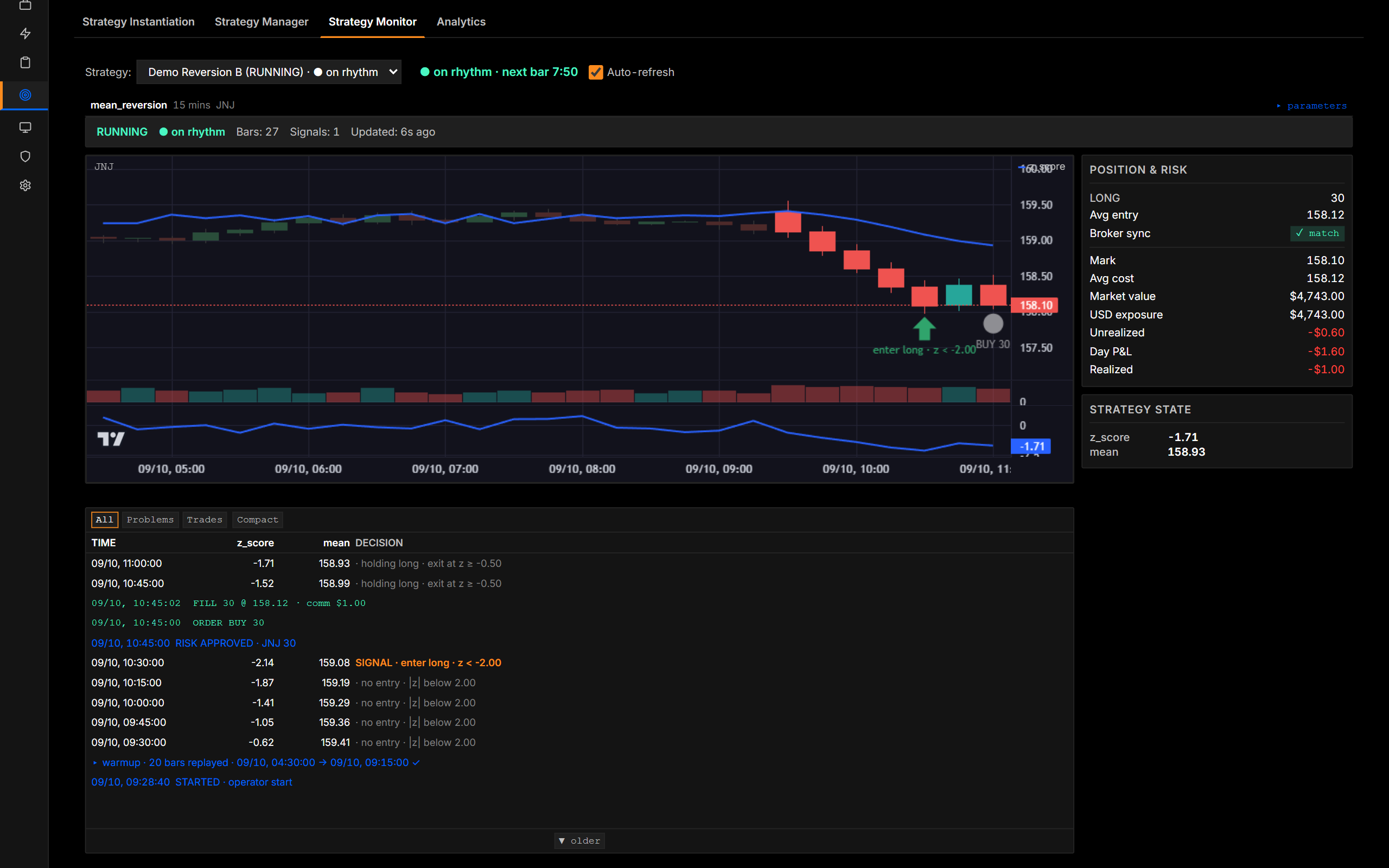
Each strategy with its own book and P&L; all of them in one portfolio.
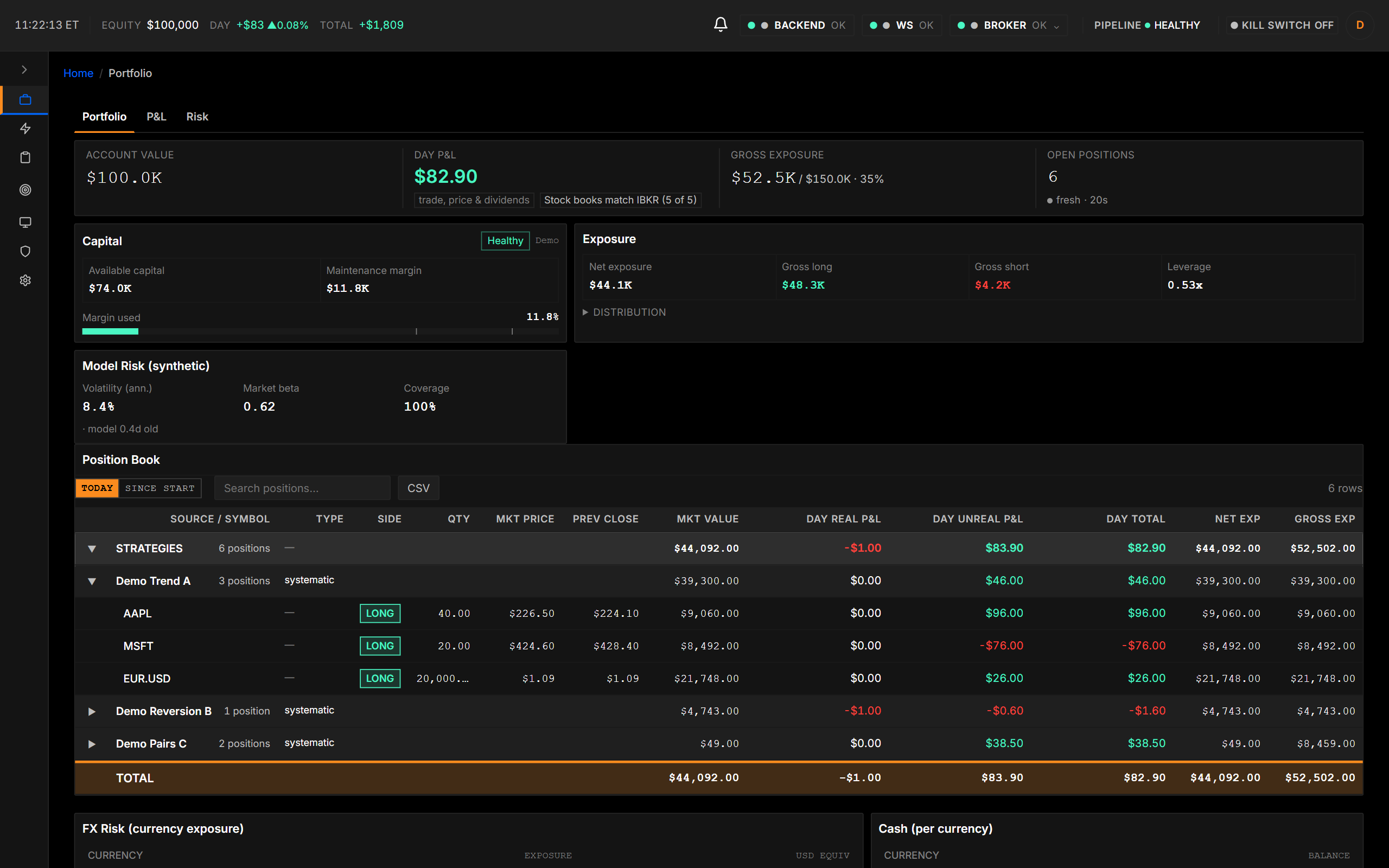
Each strategy keeps its book, its P&L and the record of why it traded or not. The portfolio brings them together with discretionary trades, which keep their own book, and measures the risk of the whole. When two strategies take opposite sides in the same stock, their orders cross internally.
- Strategy Abuys 300
- Strategy Bsells 200
- Strategy Cbuys 100
200 are crossed inside, without reaching the broker
To the broker: one buy order for 200, not three for 600.
What Console measures
- P&L
- Per strategy and for the whole portfolio, realised and unrealised, reconciled to the cent with the broker every night.
- Performance
- Return, Sharpe, Sortino, Calmar and maximum drawdown; per trade, win rate, profit factor and expectancy. On short histories, each ratio comes with its confidence level.
- Risk
- Gross and net exposure, leverage, volatility, beta and correlation between strategies, plus currency risk and the cash in each currency.
Every order passes the same check before it reaches the broker.
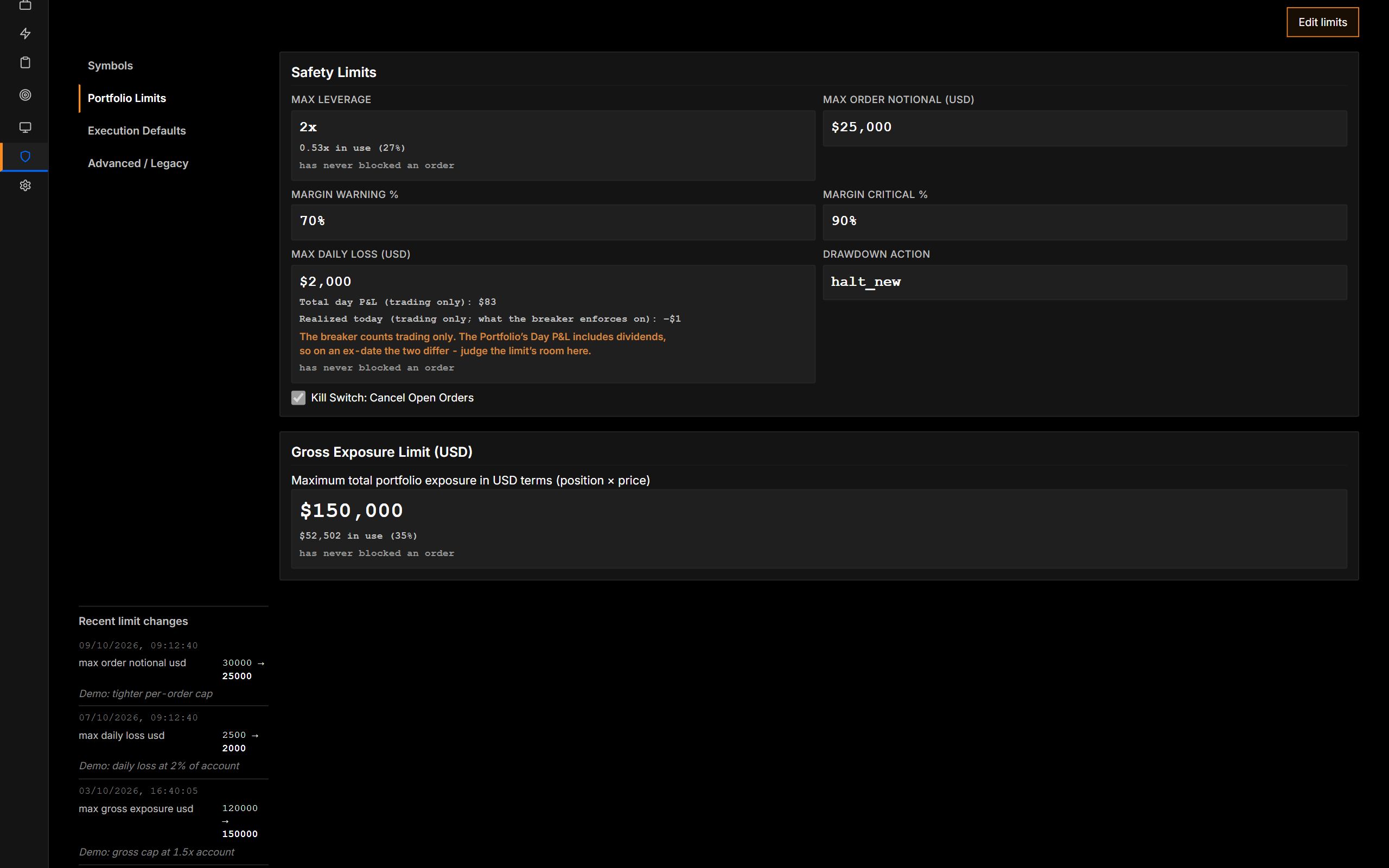
Limits are set per strategy and for the whole portfolio; Console applies them to every order and records each decision with its reason.
11 main checks
Three orders: approved, reduced and rejected before the broker.
Risk check
- Check passed
- Order reduced
- Order rejected
- Not evaluated after the first rejection
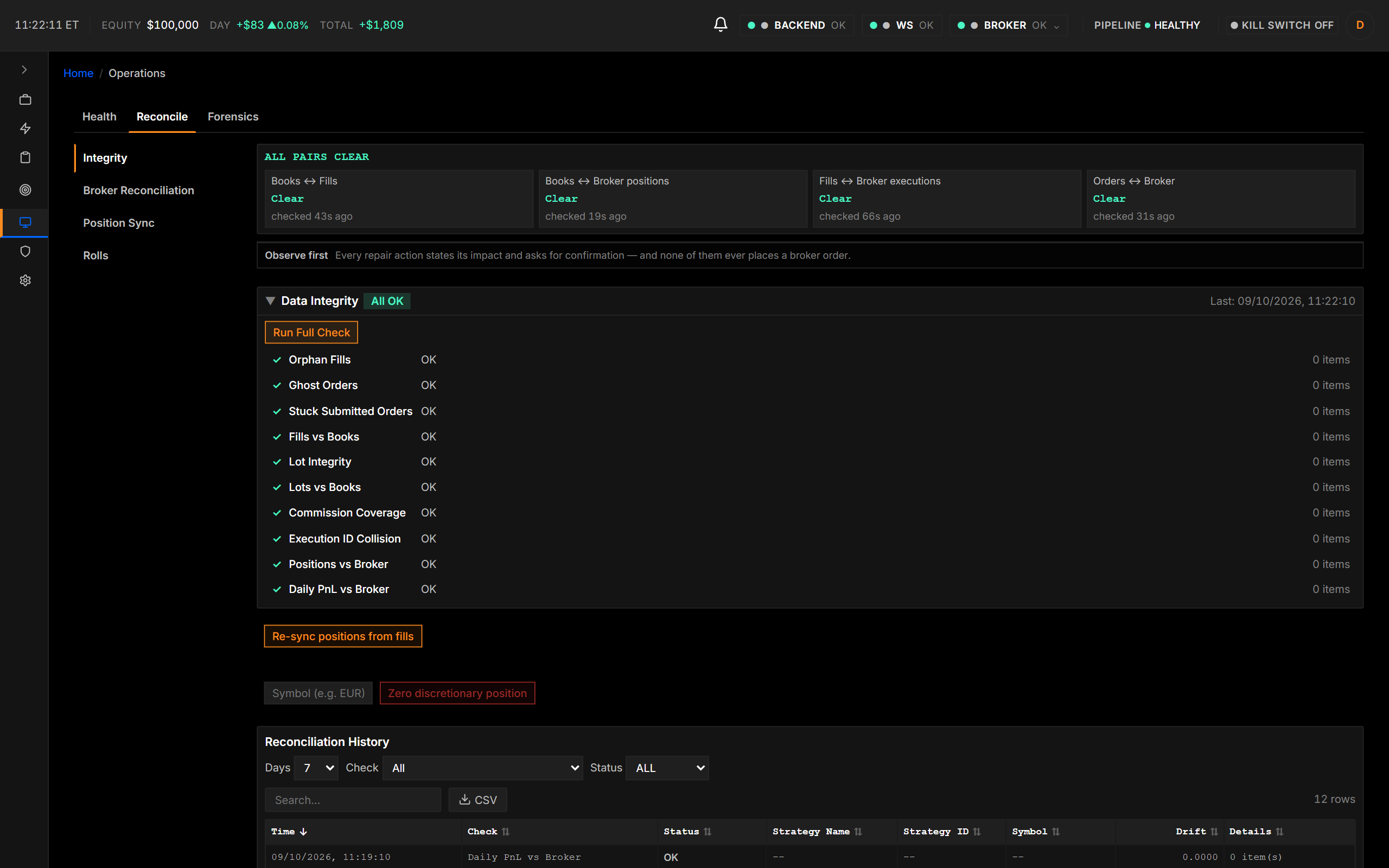
If books and broker disagree on a stock or a future, no new risk is admitted.
Everything matched to the broker; if anything fails, it halts and alerts.
Trades placed by hand in TWS go to a separate book. If anything fails, the alert reaches the phone and repeats.
Trades
Every 10 minutes
Positions
Every 2 minutes
Day P&L
To the cent, every night
Five ways to stop: pause, stop, loss limit, reduce-only mode and emergency switch. If a strategy breaches its loss limit, Console stops it and closes its positions without touching the others’.
Console watches every strategy and flags only what matters.
The strategies run on their own and Console watches them without pause. Every alert reaches the phone through Telegram and stays on Console’s screen; if the computer shuts down without anyone deciding to, an e-mail is sent as well.
Over 200types of alert, in 11 categories: strategies, orders, risk, broker, books, data and system.
Before the limit
When a strategy or the portfolio nears its loss, position or margin limit.
When something fails
A disconnection with open positions, a strategy that crashes or runs out of data, a rejected order, or books that don’t reconcile.
Until someone answers
Urgent alerts ring the phone and repeat until someone acknowledges them; when the problem clears, the alert says so.
If the alert channel stops working, Console flags that too.
Built to run real capital; tested without risking any.
Athena built it to run its own strategies. Writing the models was the natural part of the work; running them under control, measuring them and reconciling them with the broker was what took the time. Console is that infrastructure, and Athena uses it today with real capital.
Plan mode
Works out orders without sending them
Paper accounts
At Interactive Brokers
Four plans: up to 3, 10 or 50 strategies at once, and Ultra for advisers.
Starter
Up to 3 strategies · 16 GB of RAM, 4 cores
USD 29 a month + VAT (USD 34.51 in total)
EssentialRecommended
Up to 10 strategies · 32 GB of RAM, 4 cores
USD 79 a month + VAT (USD 94.01 in total)
Pro
Up to 50 strategies and 3 users · 64 GB of RAM, 8 cores
USD 199 a month + VAT (USD 236.81 in total)
Ultra
For advisers: orders to their clients’ accounts, with limits per client and setup with Athena · 64 GB of RAM, 8 cores
From USD 1,500 a month + VAT (USD 1,785.00 in total)
Each plan lists the computer it needs, the user’s own: Windows, an SSD, and the memory and cores in its row. Annual billing: 12 months for the price of 10.
Online purchase: coming soon. A plan can be chosen and a notice requested.
Software operated by the user; it is not portfolio management or investment advice. Interactive Brokers is an independent broker, not affiliated with Athena. Athena QS Console and Athena QS Studio are provided by Athena Research & Technology SpA, under the Athena Quantitative Strategies brand.
Athena QS Console: frequently asked questions
What is Athena QS Console?
An algorithmic trading platform that each user installs on their own Windows computer. It runs at Interactive Brokers the quantitative, systematic or discretionary strategies the user writes in Python, each with its own book and P&L, as one portfolio, with a risk check before every order and reconciliation with the broker. It is software the user operates: it is not portfolio management or investment advice.
How does it differ from an OMS?
An OMS, or order management system, handles orders that a person or another system has already decided: it records them, sends them and tracks their status. Console includes that order management, and it also runs the strategies that decide the orders, keeps a book and a P&L per strategy, checks each order against 11 controls before sending it, crosses opposite orders internally and reconciles the books with Interactive Brokers.
What is needed to use it?
A Windows computer with an SSD and the memory and cores each plan lists; an Interactive Brokers account with TWS or IB Gateway; market data subscribed with Interactive Brokers; and Python strategies written from Console’s template. Adapting an existing strategy usually takes under an hour.
Which countries can Console be used from?
Any country where Interactive Brokers opens accounts, Chile included: Console runs on the user’s own computer and connects to their own account. Athena develops it in Chile, and plans are paid in US dollars.
Does Athena keep the models or see the orders?
No. The models stay on the user’s computer and are only loaded into the application, which runs on that same computer. They never reach Athena, and Athena never sees the orders either, which go straight to Interactive Brokers. The only connection to Athena is the sign-in that validates the licence: each model’s intellectual property stays protected, with its author.
Are there other costs besides the plan?
The plan is a fixed monthly price, plus VAT. Separately, the user pays Interactive Brokers’ commissions and market data, any outside data each strategy brings, and the computer and connection. On Ultra, Athena helps open the adviser account and handles the setup.
Can several strategies trade in the same Interactive Brokers account?
Yes. Each strategy keeps its own book within the same account. When two take opposite sides in an instrument, their orders cross internally and only the difference goes to the broker. Both are booked at the same price, the market price at the moment of the cross, so each one’s P&L follows the market; without a reliable price, nothing is crossed and each order goes to the broker.
What happens if the connection drops or the computer restarts?
Console reconnects to Interactive Brokers. After a restart it is trading again in about 15 seconds, without losing or duplicating orders, and the books are reconciled with the broker again. If something fails, the alert reaches the phone through Telegram, repeats until someone acknowledges it, and stays on Console’s screen. If the computer shuts down unexpectedly, an e-mail is sent.
Which models and data can be used?
Whatever the user codes in Python: market regimes, statistical models, machine learning or neural networks, with their own data sources. Console supplies Interactive Brokers’ prices. Each strategy uses about 0.6 GB of memory, not counting the model.
Does Console backtest?
No. Console runs strategies; research and historical tests are done in Python, with each user’s own tools. Before risking capital, plan mode calculates the orders without sending them, and Console works with Interactive Brokers’ paper accounts. Moving to a live account is an explicit step.
Which markets and frequencies does it support?
US stocks, CME Group futures and spot FX at Interactive Brokers. Each strategy computes its signals on a cadence of one minute or more, from the data its author defines.
Is it built for high-frequency trading (HFT)?
Not yet. Console is built for strategies that compute their signals on a cadence of one minute or more, from the data each user defines, and hold positions for minutes to months. It is tested with 50 strategies running at once on a one-minute cadence. It supports a continuous websocket connection for sub-minute trading, and it will soon be optimised for that.
Does it trade options?
Not yet. It will soon support options strategies, with their Greeks measured. Today it trades US stocks, CME Group futures and spot FX.
Does Athena manage the money or give advice?
No. Console is software the user operates, in their own account and with their own limits. Athena does not manage or hold funds, or transmit or execute orders. Interactive Brokers is an independent broker, not affiliated with Athena.